

Pangu FRP Bypass APK helps unlock Android devices locked by the Factory Reset Protection. It’s popular for bypassing Google account verification.
Pangu FRP Bypass APK is a handy tool for Android users who need to bypass the Factory Reset Protection (FRP) on their devices. FRP is a security feature introduced by Google to protect lost or stolen phones. While it’s beneficial, it can be a hassle if you forget your login credentials after a factory reset.
This APK simplifies the process, allowing users to regain access to their phones without needing extensive technical knowledge. It supports various Android versions, making it a versatile solution. Always ensure you download the APK from a reliable source to avoid malware risks.
Introduction To Pangu Frp Bypass APK
The Pangu FRP Bypass APK is a tool designed to bypass the Factory Reset Protection (FRP) on Android devices. This tool is essential for users who are locked out of their devices due to forgotten Google account credentials. With Pangu FRP Bypass, you can regain access to your smartphone quickly and efficiently.
What Is Frp?
Factory Reset Protection (FRP) is a security feature on Android devices. It is designed to protect your device from unauthorized access after a factory reset. Once FRP is enabled, you must enter the Google account credentials associated with the device to use it.
FRP is an effective deterrent against theft. It ensures that even if someone resets your phone, they cannot use it without your credentials. This feature provides an added layer of security for your personal information.
Importance Of Bypassing Frp
Sometimes, users forget their Google account credentials. This results in being locked out of their own devices. In such cases, bypassing FRP becomes crucial. Tools like Pangu FRP Bypass APK help you regain access without much hassle.
Bypassing FRP is also important for device resale. If you are selling your device, you need to ensure the new owner can use it. Removing FRP ensures the device is fully functional for the next user.
Pangu FRP Bypass APK is easy to use. It is an effective solution for users facing FRP lock issues. With this tool, you can unlock your device in a few simple steps.
Features Of Pangu Frp Bypass APK
Pangu FRP Bypass APK offers several features that make it a top choice for bypassing FRP locks. These features ensure ease of use and high compatibility with various devices.
User-friendly Interface
Pangu FRP Bypass APK has a user-friendly interface. Even beginners can navigate easily. The layout is simple and intuitive. Users can follow the steps without confusion. The instructions are clear and concise.
| Feature | Description |
|---|---|
| Easy Navigation | Simple layout for quick access to features |
| Clear Instructions | Guides users step-by-step |
| Beginner-Friendly | Designed for users with no technical skills |
Compatibility With Devices
The Pangu FRP Bypass APK is highly compatible with various devices. It supports most Android devices. This includes brands like Samsung, Huawei, LG, and more. Users can rely on it for a wide range of models.
- Supports Samsung Galaxy series
- Works with Huawei devices
- Compatible with LG smartphones
- Supports many other Android models
The APK ensures that most users can benefit from its features. It covers a broad spectrum of devices, making it versatile and reliable. Users do not need to worry about compatibility issues.
How To Download Pangu Frp Bypass APK
Downloading Pangu FRP Bypass APK helps unlock your Android device. Follow this simple guide to download it safely and efficiently.
Trusted Sources
To ensure a safe download, always use trusted sources. Avoid unknown websites to prevent malware or viruses.
- Visit official websites for the download link.
- Use reputable forums for user recommendations.
Step-by-step Guide

- Open your device’s browser.
- Search for “Pangu FRP Bypass APK”.
- Choose a trusted source from the search results.
- Click the download link.
- Wait for the download to complete.
- Locate the downloaded file in your device’s download folder.
- Tap on the file to start the installation process.
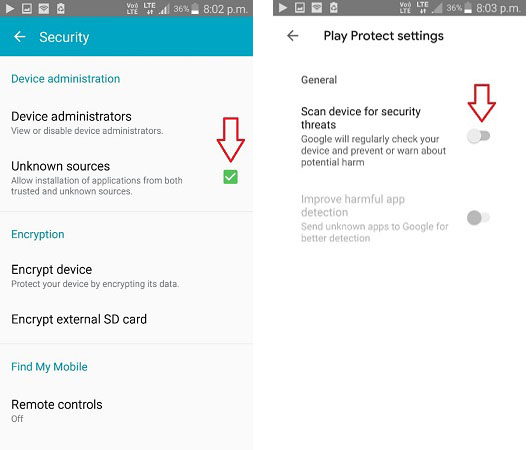
Ensure you have enabled “Install from unknown sources” in your device settings. This allows the APK to install properly.
Credit: itoolab.com
Installing Pangu Frp Bypass APK
Installing the Pangu FRP Bypass APK can unlock your phone quickly. This guide will walk you through the installation process step-by-step. Make sure your device meets the necessary requirements.
System Requirements
| Requirement | Details |
|---|---|
| Operating System | Android 5.0 and above |
| Storage Space | Minimum 50 MB of free space |
| Internet Connection | Stable Wi-Fi or Mobile Data |
| USB Cable | For connecting to a PC |
Installation Process
- Download the Pangu FRP Bypass APK from a trusted source.
- Enable Unknown Sources in your phone settings.
- Navigate to
Settings > Security > Unknown Sources. - Locate the downloaded APK file in your file manager.
- Tap on the APK file to begin the installation.
- Follow the on-screen instructions to complete the installation.
- Once installed, open the app and follow the prompts to bypass FRP.
Ensure you have a stable internet connection during the process. This will help avoid interruptions.
Using Pangu Frp Bypass APK
Pangu FRP Bypass APK is a powerful tool. It helps you remove the FRP lock from your Android device. Follow these steps for a successful bypass.
Initial Setup
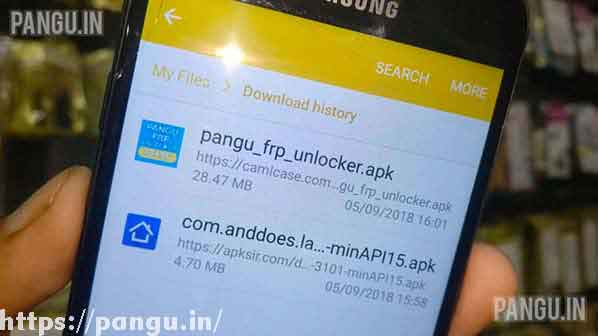
Download the Pangu FRP Bypass APK file on your computer or phone. Make sure to get it from a trusted source. Transfer the file to your locked device using a USB cable.
Enable Unknown Sources on your device. Go to Settings > Security > Unknown Sources. This allows you to install apps outside the Play Store.
| Step | Action |
|---|---|
| 1 | Download Pangu FRP Bypass APK |
| 2 | Transfer to the locked device |
| 3 | Enable Unknown Sources |
Bypassing Frp Lock
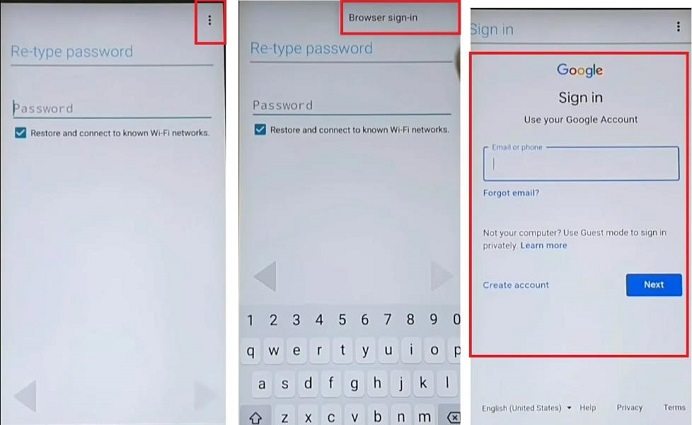
Locate the transferred APK file on your device. Use a file manager app if necessary. Tap on the file to start the installation process.
Once installed, open the Pangu FRP Bypass APK. Follow the on-screen instructions carefully. It will guide you through the bypass process step-by-step.
- Open the installed Pangu FRP Bypass app
- Follow the instructions
- Complete the bypass process
After the bypass, restart your device. The FRP lock should be removed. Your device is now accessible without any restrictions.
- Install the APK
- Open the app
- Follow the instructions
- Restart your device
Using Pangu FRP Bypass APK is a straightforward process. Ensure you follow all steps correctly for a successful bypass.
Credit: www.tenorshare.com
Benefits Of Using Pangu Frp Bypass APK
The Pangu FRP Bypass APK offers many advantages. This tool helps users regain access to their devices. Learn about its key benefits below.
Time-saving
Using the Pangu FRP Bypass APK is very quick. It reduces the time needed to unlock your device. You do not need to visit a service center. The process only takes a few minutes. This makes it an efficient solution for everyone.
Cost-effective
The Pangu FRP Bypass APK is free to use. You save money on professional services. There are no hidden charges or fees. This makes it a budget-friendly option for many users.
| Benefit | Description |
|---|---|
| Time-Saving | Quick and easy device unlocking |
| Cost-Effective | No need for paid services |
Common Issues And Fixes
Using the Pangu FRP Bypass APK can sometimes lead to a few common issues. These issues range from installation errors to bypass failures. This section will address these problems and provide practical solutions.
Installation Errors
Installation errors are a frequent problem with the Pangu FRP Bypass APK. These errors can prevent the app from being installed properly. Here are some common installation errors and their fixes:
| Error | Solution |
|---|---|
| Parse Error | Ensure your device supports the APK file. Update your Android version. |
| Insufficient Storage | Free up space on your device. Delete unused apps or files. |
| Unknown Sources Disabled | Enable installation from unknown sources. Go to Settings > Security. |
Bypass Failures
Sometimes, the Pangu FRP Bypass APK fails to bypass the FRP lock. This can be frustrating, but there are solutions:
- Ensure Correct Version: Make sure you are using the latest version of the app.
- Check Internet Connection: A stable internet connection is crucial. Connect to a reliable Wi-Fi network.
- Device Compatibility: Verify that your device is compatible with the app. Check the app’s documentation.
- Follow Instructions: Carefully follow all the steps provided in the guide. Missing a step can cause failures.
By addressing these common issues, you can improve your experience with the Pangu FRP Bypass APK. Proper troubleshooting can ensure a smoother process and successful bypass.
Credit: www.pangu.in
Safety And Security
Safety and security are crucial when using any app. This is especially true for tools like Pangu FRP Bypass APK. In this section, We will discuss two important aspects: data privacy and avoiding malware.
Data Privacy
Using Pangu FRP Bypass APK means handling sensitive data. Always ensure your data stays private. Here are some tips:
- Download the APK from a trusted source only.
- Check app permissions before installation.
- Use a VPN for added security.
Following these steps helps protect your private information. Keeping your data safe should always be a priority.
Avoiding Malware
Malware can harm your device. Avoiding it is very important. Here’s how:
- Scan the APK file with antivirus software.
- Read user reviews before downloading the app.
- Keep your device’s software updated.
These actions can help you avoid malware. Protect your device and your data effectively.
Alternatives To Pangu Frp Bypass APK
If you need an alternative to Pangu FRP Bypass APK, there are several options. These tools also help bypass FRP (Factory Reset Protection) on Android devices. Below, we will explore some popular alternatives.
Other FRP Bypass Tools
- FRP Hijacker: Works well with Samsung devices. It is user-friendly and effective.
- GSM Flasher Tool: Compatible with many Android brands. It offers a simple interface.
- D&G Password Unlocker: Supports various Android models. It is easy to use and reliable.
Comparative Analysis
| Tool | Compatibility | User-Friendliness | Effectiveness |
|---|---|---|---|
| Pangu FRP Bypass APK | All Android devices | Moderate | High |
| FRP Hijacker | Samsung devices | Easy | High |
| GSM Flasher Tool | Various Android brands | Easy | Moderate |
| D&G Password Unlocker | Various Android models | Easy | High |
Choosing the right tool depends on your device and preferences. Some tools are specific to certain brands. Others offer broader compatibility. Always ensure you download from a trusted source to avoid malware.
Frequently Asked Questions
What Is Pangu Frp Bypass Apk?
Pangu FRP Bypass APK is a tool designed to bypass Google’s Factory Reset Protection on Android devices. It helps users regain access to their phones without needing the original Google account credentials.
Is Pangu Frp Bypass APK Safe?
Yes, Pangu FRP Bypass APK is generally safe to use. However, always download it from a trusted source to avoid malware or viruses. Ensure you follow the instructions carefully to avoid any issues.
How Do I Use Pangu Frp Bypass APK?
To use the Pangu FRP Bypass APK, download the app and install it on your locked device. Follow the on-screen instructions to bypass the Google account verification.
Can I Download the Pangu Frp Bypass APK for Free?
Yes, the Pangu FRP Bypass APK is available for free download. Ensure you download it from a reputable source to avoid any malicious software.
Conclusion
Unlocking your device has never been easier with Pangu FRP Bypass APK. This tool ensures quick and secure access. Say goodbye to frustrating lock screens and regain control. Download and try it today for a hassle-free experience. Enjoy the freedom of a fully accessible device once again.