
To bypass the FRP on an Addrom device, use specialized tools or software designed for this purpose. Ensure the method is compatible with your device model and Android version.
FRP, or Factory Reset Protection, is a security feature on Android devices. It protects your phone from unauthorized access after a factory reset. Bypassing FRP can be necessary if you forget your Google account credentials. Various tools and software are available to help with this process.
Always choose a reliable and trusted method to avoid further complications. Some popular options include Addrom tools, which are tailored for specific devices. Ensure you follow a detailed guide to avoid errors. Bypassing FRP should only be done on devices you legally own.

Credit: addrom.com
Introduction To FRP Bypass
FRP Bypass is a method to unlock a device. It is used when you forget your Google account credentials. This process helps regain access to your device quickly and easily.
What Is Frp?
FRP stands for Factory Reset Protection. It is a security feature on Android devices. FRP protects your phone from unauthorized access after a factory reset. This means only the device owner can unlock the phone using their Google account.
Importance Of Bypassing Frp
Bypassing FRP is crucial when you forget your Google account details. Without the bypass, you cannot use your device. It helps in situations where you buy a second-hand phone, and the previous owner did not remove their account. Bypassing FRP ensures you can access and use your device fully.
Addrom Frp Bypass Overview
Addrom FRP Bypass is a powerful tool for removing Factory Reset Protection (FRP) on Android devices. It helps users regain access to their phones when they forget their Google account credentials. This tool is user-friendly and effective.
Features Of Addrom
Addrom FRP Bypass comes with several key features:
- Easy to Use: The interface is simple and intuitive.
- Quick Bypass: It can remove FRP locks in minutes.
- Free of Cost: Users can access it without any charges.
- Regular Updates: The tool receives frequent updates for better performance.
Compatibility With Devices
Addrom FRP Bypass supports a wide range of devices. Here is a list of compatible brands:
| Brand | Model Range |
|---|---|
| Samsung | Galaxy Series, Note Series |
| Huawei | P Series, Mate Series |
| LG | G Series, V Series |
| Motorola | Moto Series |
The tool also supports many other Android brands. It works on different versions of Android OS.
Overall, Addrom FRP Bypass is a reliable and efficient solution for bypassing FRP locks.
Preparing Your Device
Before you start using Addrom FRP Bypass, ensure your device is ready. Proper preparation can prevent potential issues and data loss. Follow these steps to get your device ready for the process.
Necessary Precautions
Taking necessary precautions is crucial for a smooth FRP bypass. Here are some important steps to follow:
- Charge your device to at least 50% battery level.
- Ensure your device is connected to a stable Wi-Fi network.
- Remove any SD cards or external storage devices.
- Ensure you have the correct Addrom FRP Bypass tool for your device model.
Backing Up Data
Backing up your data is essential to avoid losing important files. Follow these steps to back up your data:
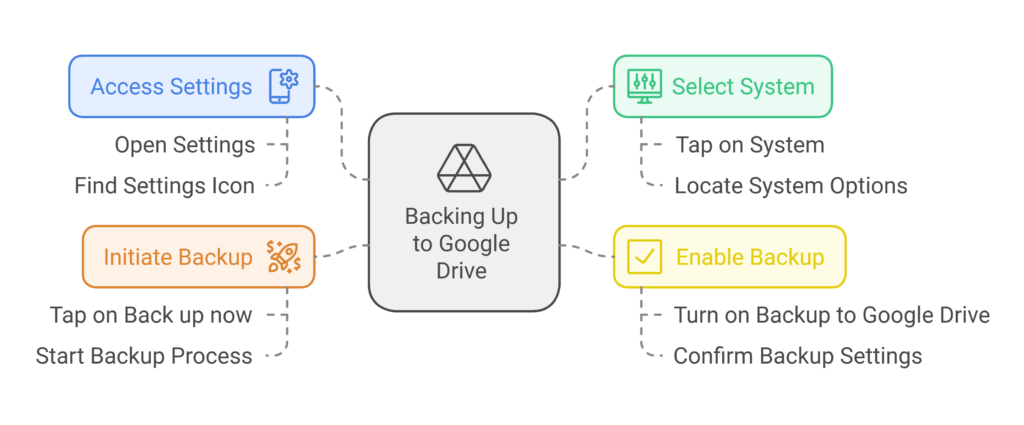
- Go to the Settings menu on your device.
- Select System and then tap on Backup.
- Turn on Backup to Google Drive.
- Tap on Back up now to start the process.
Make sure to back up your contacts, photos, and other critical data. You can use cloud services like Google Drive or Dropbox for additional safety.
Downloading Addrom Frp Tool
Downloading the Addrom FRP Tool is essential for bypassing the FRP lock on Android devices. The process is straightforward and ensures you can regain access to your device efficiently.
Where To Find The Tool
To download the Addrom FRP Tool, visit the official Addrom website. The tool is also available on trusted tech forums and software download sites. Ensure you download it from a reliable source to avoid malware.
| Source | Link |
|---|---|
| Official Addrom Website | addrom.com |
| Tech Forums | Various trusted tech forums |
| Software Download Sites | Reputable software download sites |
System Requirements
Before downloading, ensure your system meets the requirements. This ensures the tool runs smoothly and efficiently.
- Operating System: Windows 7, 8, 8.1, 10
- RAM: Minimum 1 GB
- Processor: At least 1 GHz
- Storage: 50 MB free space
- USB Port: Required for device connection
Having the right system specifications is crucial. It ensures the tool operates without issues and successfully bypasses the FRP lock.
Step-by-step Bypass Guide
Navigating the Addrom FRP Bypass can be challenging. This step-by-step guide simplifies the process. Follow each step carefully to unlock your device without hassle.
Connecting Your Device
First, ensure your device is fully charged. A charged device prevents interruptions. Next, gather a USB cable and a computer. Connect your device to the computer using the USB cable.
Once connected, enable USB Debugging. Access the settings menu and find “Developer Options.” If “Developer Options” is hidden, tap “Build Number” seven times. This action reveals the hidden menu.
| Step | Action |
|---|---|
| 1 | Charge your device fully. |
| 2 | Gather a USB cable and computer. |
| 3 | Connect your device to the computer. |
| 4 | Enable USB Debugging in Developer Options. |
Executing The Bypass
Download the necessary FRP Bypass Tool. Many reliable tools are available online. After downloading, install the tool on your computer. Open the tool and wait for your device to be detected.
Follow the on-screen instructions provided by the tool. Each tool may have slight variations. Ensure you follow each step accurately. The tool will prompt you to perform specific actions on your device.
- Download a reliable FRP Bypass Tool.
- Install the tool on your computer.
- Open the tool and connect your device.
- Follow the on-screen instructions carefully.
After completing the steps, your device should be bypassed. Restart your device and check its functionality. You have successfully bypassed the FRP lock.
Troubleshooting Common Issues
Using Addrom FRP Bypass can sometimes present challenges. To help you, we have compiled solutions for common issues. Below, you will find troubleshooting steps for connection problems and tool malfunctions.
Connection Problems
Sometimes, connection issues arise when using Addrom FRP Bypass. Here are some steps to resolve them:
- Check USB Cable: Ensure your USB cable is functioning. Try a different one if needed.
- Restart Devices: Restart both your phone and computer to reset connections.
- Update Drivers: Make sure your phone drivers are up to date. Visit the manufacturer’s site for updates.
- Switch USB Ports: Use a different USB port on your computer.
- Disable Antivirus: Sometimes antivirus software blocks connections. Temporarily disable it.
These steps should help you fix most connection problems.
Tool Malfunctions
Tool malfunctions can disrupt the bypass process. Follow these tips to troubleshoot:
- Re-download Addrom Tool: Download the latest version from the official website.
- Check System Requirements: Ensure your computer meets the tool’s system requirements.
- Run as Administrator: Right-click on the tool and select ‘Run as Administrator’.
- Clear Cache: Clear your computer’s cache to improve performance.
- Reinstall Software: Uninstall and reinstall the Addrom FRP Bypass tool.
If the problem persists, consider reaching out to support forums for additional help.
Post-bypass Considerations
After successfully using the Addrom FRP Bypass, it’s essential to address a few post-bypass considerations. These steps ensure your device remains secure and fully functional.
Device Security
Maintaining device security is crucial after bypassing FRP. Follow these steps to keep your device safe:
- Set a strong password: Use a mix of letters, numbers, and symbols.
- Enable two-factor authentication: Add an extra layer of security.
- Install a reliable antivirus: Protect against malware and viruses.
Regularly update your device’s software. Updates often include security patches. Always download apps from trusted sources. This minimizes the risk of installing malicious software.
Restoring Data
After securing your device, focus on restoring your data. Follow these steps to recover your information:
- Backup data: Use cloud services or external storage.
- Restore contacts: Sync with your Google or Apple account.
- Recover apps: Reinstall from the official app store.
Check for any missing files or apps. Make sure everything is in place. Verify the integrity of your restored data. This ensures you don’t lose any important information.
Consider using a table to manage your data restoration process. This helps track what has been restored and what still needs attention.
| Data Type | Status |
|---|---|
| Contacts | Restored |
| Photos | Pending |
| Documents | Restored |
| Apps | Pending |
Legal And Ethical Implications
Understanding the legal and ethical implications of using Addrom FRP Bypass is crucial. This tool helps bypass Factory Reset Protection (FRP) on Android devices. Misusing it can lead to serious consequences. Let’s delve into the legal risks and ethical use.
Understanding Legal Risks
Bypassing FRP on a device you do not own is illegal. It can lead to criminal charges. Always ensure you have the owner’s permission. Unauthorized use may result in fines or imprisonment.
The Digital Millennium Copyright Act (DMCA) protects digital rights. Bypassing security features violates this act. Legal action can be taken against offenders.
| Action | Legal Consequence |
|---|---|
| Unauthorized Bypass | Fines, Legal Action |
| DMCA Violation | Imprisonment, Heavy Fines |
Ethical Use Of FRP Bypass
Ethical use of Addrom FRP Bypass is important. Only use it on devices you own. Ensure you have explicit permission from the owner if you do not own the device.
Consider the privacy implications. Respect the data and privacy of others. Do not use the tool to access someone’s personal information without consent.
- Use on your own devices
- Get permission for other devices
- Respect privacy and data
Frequently Asked Questions
What Is Addrom Frp Bypass?
Addrom FRP Bypass is a tool used to bypass Google’s Factory Reset Protection (FRP). It helps regain access to locked Android devices. This tool is especially useful when you forget your Google account credentials.
How Does Addrom Frp Bypass Work?
Addrom FRP Bypass works by exploiting vulnerabilities in the Android OS. It allows users to bypass the Google verification process. By following specific steps, you can regain access to your locked device.
Is Addrom Frp Bypass Safe To Use?
Using Addrom FRP Bypass can be safe if done correctly. However, it involves some risks, like potential data loss. Always follow the instructions carefully and back up your data beforehand.
Which Devices Support Addrom Frp Bypass?
Addrom FRP Bypass supports a wide range of Android devices. It works with brands like Samsung, Huawei, LG, and more. Ensure your device is compatible before using the tool.
Conclusion
Bypassing FRP with Addrom is a straightforward process. This guide makes it simple for anyone to follow. Remember to always use these methods responsibly. Stay informed and keep your devices secure. For more tips and tricks, explore our other blog posts.
Thank you for reading and happy troubleshooting!